What is Drupal ?
Drupal is a popular open-source content management system (CMS) written in PHP and built upon the Symfony framework. It is used worldwide to create a wide variety of websites and applications, ranging from personal blogs to enterprise-level corporate websites. Here are some key aspects and benefits of Drupal.
Benefits of Drupal ?
- Content Management: Drupal provides robust content management capabilities, allowing users to create, edit, publish, and manage content easily. It supports various content types, including articles, blog posts, pages, forums, polls, and more.
- Flexibility and Extensibility: Drupal is highly flexible and extensible, thanks to its modular architecture. Users can extend its functionality by installing and configuring modules from the Drupal community, which offers thousands of contributed modules for various purposes such as SEO, e-commerce, social networking, and more.
- Customization: Drupal allows for extensive customization to meet specific requirements. It provides a powerful theming system that enables users to create unique designs and layouts using HTML, CSS, and JavaScript. Additionally, developers can create custom modules to implement specific features and functionality tailored to their needs.
- Scalability: Drupal is scalable and can handle websites of all sizes, from small personal blogs to large enterprise-level applications with millions of visitors. Its robust architecture and caching mechanisms ensure optimal performance even under high traffic loads.
- Security: Drupal takes security seriously and has a dedicated security team that actively monitors and addresses vulnerabilities. It follows best practices for security, such as regular security updates, secure coding standards, and access control mechanisms, to help protect websites from security threats and attacks.
File structure of Drupal
In Drupal, the file structure typically follows a modular approach, with different directories dedicated to specific types of files and functionalities. Here’s a basic overview of the typical file structure in a Drupal installation:
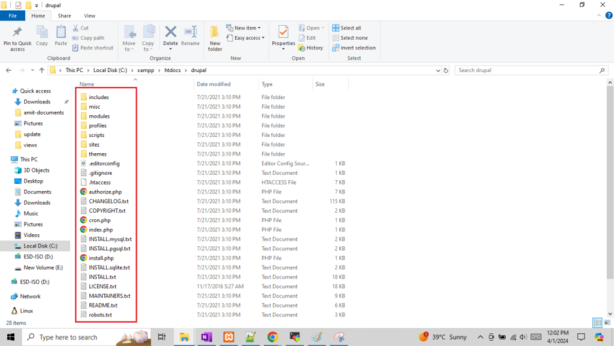
- Root Directory: This is the main directory where Drupal is installed. It contains various files and folders, including:
index.php: The main entry point for Drupal.composer.jsonandcomposer.lock: Files used for managing dependencies with Composer.update.php: Script for updating Drupal core and modules.cron.php: Script for running scheduled tasks.robots.txtandsettings.php: Configuration files.- Other files related to Drupal core and third-party libraries.
- Core Directory (
/core): This directory contains all the core files of Drupal, including the core modules, libraries, and files needed to run Drupal. - Modules Directory (
/modules): This directory contains contributed modules installed on the site. Each module typically has its own subdirectory within/modules, containing PHP files, configuration files, templates, and other assets specific to that module. - Themes Directory (
/themes): This directory contains contributed and custom themes used to control the look and feel of the site. Each theme has its own subdirectory within/themes, containing templates, CSS files, JavaScript files, and other assets. - Profiles Directory (
/profiles): This directory contains installation profiles, which are pre-defined configurations of Drupal core and modules tailored for specific use cases (e.g., standard, minimal, etc.). - Vendor Directory (
/vendor): This directory contains third-party libraries and dependencies managed by Composer. - Sites Directory (
/sites): This directory contains site-specific configuration, files, and modules. It typically includes subdirectories for each site installed on the Drupal instance, named after the site’s domain or subdomain./sites/default: This subdirectory contains the default configuration files (settings.php,services.yml, etc.) and thefilesdirectory for storing uploaded files and site-specific assets.
- Files Directory (
/sites/default/files): This directory is used to store uploaded files, such as images, documents, and other media assets. It’s configurable and can be changed in the Drupal configuration (settings.php).
This is a simplified overview of the Drupal file structure. Depending on the site’s configuration, additional directories and files may be present to support custom modules, libraries, and configurations.
